Editorial review recorded; verify sources before use.
Specifications describe model-level options, not the configuration of an individual Mac.
Overview
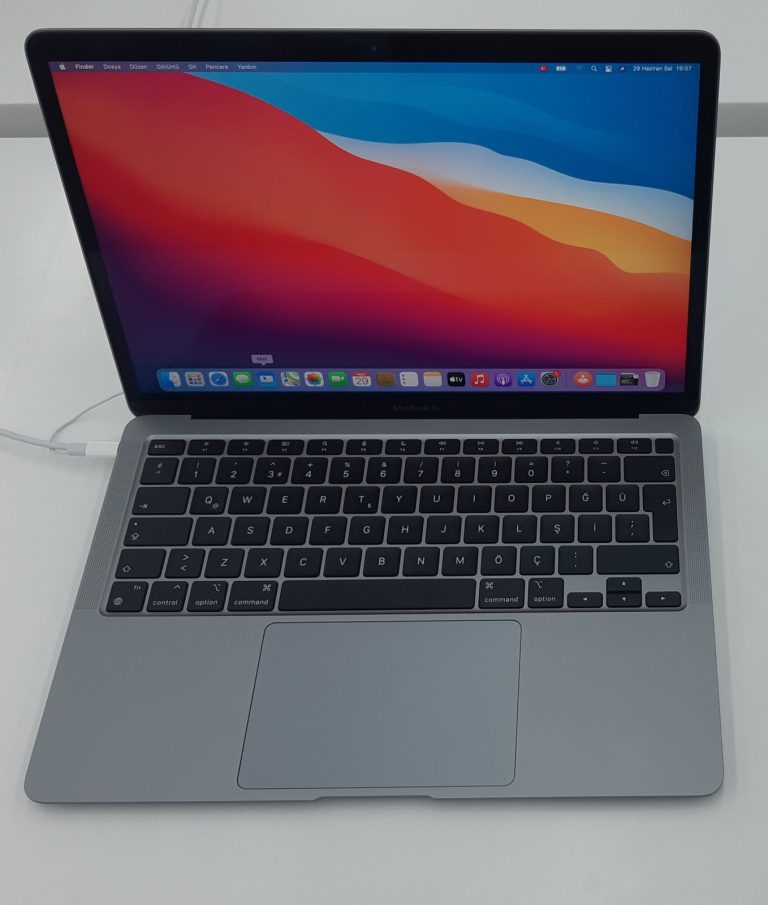
The 2019 Retina 13-inch MacBook Air is an Intel-based notebook identified as MacBookAir8,2. It shares much of its visual design with the 2018 Retina Air but introduced True Tone to the display. It should not be confused with the 2020 Intel MacBook Air, which adopted the Magic Keyboard and offered a different processor family. Small differences between these generations can matter when buying used, troubleshooting a keyboard, or selecting repair components.
Use About This Mac to confirm the model name and identifier. External appearance and color alone are not sufficient, because neighboring Air generations share a similar enclosure. For a used computer, the actual processor, battery condition, memory, and SSD capacity are more informative than the label “Retina MacBook Air.”
Processor and memory
Apple specifies a 1.6GHz dual-core Intel Core i5 processor with Turbo Boost up to 3.6GHz and Intel UHD Graphics 617. This is not an M-series processor, and the machine does not have the performance characteristics or OS support of the later Apple silicon notebooks. It is suitable to evaluate for modest workloads only after checking the performance of the applications the buyer actually intends to run.
The standard onboard memory is 8GB of 2133MHz LPDDR3, with a 16GB factory configuration available. Original SSD capacities begin at 128GB, with larger configurations including 256GB, 512GB, and 1TB. Verify the installed memory and capacity before purchase; an older Mac with very little storage may quickly become inconvenient even if its exterior appears clean.
Retina display, ports, and peripherals
The 13.3-inch Retina screen has 2560-by-1600 native resolution and True Tone. The notebook provides two Thunderbolt 3 USB-C ports and a headphone jack. Those ports carry charging and external device connections, so physical wear or liquid damage can affect several functions at once. Test both ports with suitable known-good equipment rather than assuming that charging through one proves all data and video modes work.
Apple specifies support for a single external 5K display at 60Hz or up to two 4K displays at 60Hz. These are native display-support limits, not promises that every dock or adapter will work. The 720p FaceTime HD camera is adequate for basic calls, but its resolution differs from later Air models. The 2019 configuration also includes Wi-Fi over 802.11ac and Bluetooth 4.2.
Battery, keyboard, and macOS support
Apple rates the built-in 49.9-watt-hour battery for up to 12 hours of wireless web use in its original test environment. An older battery may no longer achieve anything close to that figure. Look at its service condition and practical runtime, and consider the availability and cost of a battery replacement before selecting the least expensive used example.
This generation predates the Magic Keyboard introduced on the Intel Air in 2020, so keyboard condition deserves a deliberate check. Apple identifies macOS Sonoma as the newest officially compatible operating system for MacBookAir8,2. Newer macOS versions should not be presented as officially supported, even if unsupported community installation approaches are available elsewhere.
Buying and repair decisions
Test every key, the trackpad, Touch ID, the Retina display, battery, speakers, camera, wireless networking, and Thunderbolt ports. Confirm the Mac is not Activation Locked and is not still managed by an organization. Check the correct charging accessory and avoid assuming that a replacement part listed for “MacBook Air 2018–2020” fits every configuration.
The 2019 Intel Air can be useful for particular legacy workflows, but its official macOS ceiling and age should be considered alongside the cost of repairs. Users who need current operating systems, long battery life, or better sustained performance should compare the actual features of newer Apple silicon models rather than deciding only from a headline price.
Specifications
| Family | MacBook Air |
|---|---|
| Model year | 2019 |
| Model Identifier | MacBookAir8,2 |
| Model number (A-number) | Not verified |
| Processor / chip | Intel Core i5 (1.6GHz dual-core) |
| Architecture | Intel (x86-64) |
| CPU | 1.6GHz dual-core Intel Core i5, Turbo Boost up to 3.6GHz |
| GPU | Intel UHD Graphics 617 |
| Memory | 8GB 2133MHz LPDDR3 onboard memory; configurable to 16GB |
| Storage | 128GB PCIe SSD; configurable to 256GB, 512GB, or 1TB |
| Built-in display | 13.3-inch Retina, 2560 × 1600, IPS, True Tone |
| Ports | Two Thunderbolt 3 (USB-C) ports, 3.5mm headphone jack |
| Wireless | 802.11ac Wi-Fi; Bluetooth 4.2 |
| Battery | 49.9Wh built-in battery; Apple rates up to 12 hours wireless web |
| Camera | 720p FaceTime HD camera |
| External display support | One 5K/60Hz display or up to two 4K/60Hz displays |
| Original macOS | macOS Mojave |
| Latest officially compatible macOS | Not verified |
| Repair and upgrade notes | Not verified |
Sources and verification
Editorially reviewed · Last checked 2026-11-08
For firmware and recovery information, consult the 4macos firmware catalog and confirm the exact Model Identifier before restoring. Software compatibility and signing can change.