Editorial review recorded; verify sources before use.
Specifications describe model-level options, not the configuration of an individual Mac.
Overview
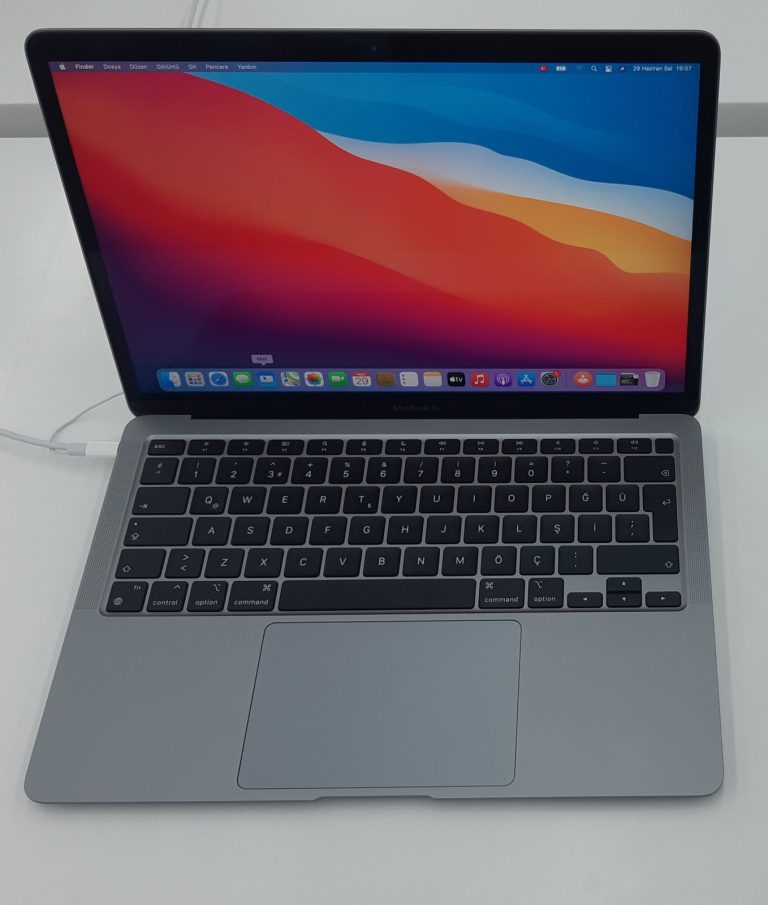
The Retina 13-inch MacBook Air introduced in early 2020 is an Intel-based computer, not the later MacBook Air with M1 released toward the end of the same year. The distinction matters for processor architecture, supported macOS versions, service procedures, and use of Intel-specific applications and external hardware. This model uses Model Identifier MacBookAir9,1. Verify that identifier before selecting replacement parts or following recovery instructions.
Apple updated this generation with the Magic Keyboard and tenth-generation Intel Core processors. The keyboard is an important practical difference from the 2018 and 2019 Retina Air models. Inspect the actual unit rather than assuming that all Retina MacBook Air models from nearby years have identical keyboard mechanisms.
Intel configurations and graphics
The base CPU is a 1.1GHz dual-core Intel Core i3, with optional quad-core Core i5 at 1.1GHz or Core i7 at 1.2GHz. Apple lists Intel Iris Plus Graphics rather than a discrete GPU. Configuration makes a noticeable difference to heavy workloads, so verify the installed processor in system information. The machine is based on Intel x86-64 architecture and should not be described as an Apple silicon laptop.
The notebook shipped with 8GB of 3733MHz LPDDR4X onboard memory and could be configured with 16GB. Original SSD choices ranged from 256GB up to 2TB. The memory is onboard; it is not a normal slot-based RAM upgrade. Examine available storage and installed memory before comparing prices with newer M1 or M2 Air systems.
Screen and external connections
The 13.3-inch Retina display has 2560-by-1600 native resolution and supports True Tone. The model includes two Thunderbolt 3 USB-C ports and a 3.5mm headphone jack. Apple’s technical specifications describe external-monitor arrangements including one 6K display at 60Hz or up to two 4K displays at 60Hz. Confirm the cable and adapter requirements for any particular monitor, especially if a high-resolution display is central to the intended use.
Unlike Apple silicon Air models, Intel notebooks can have different software and accessory compatibility characteristics. That can matter for older peripherals, specialized utilities, and boot workflows. It does not mean every Intel accessory or third-party driver will work with every macOS version. Check the exact accessory manufacturer’s documentation before committing to an upgrade.
Battery and macOS ceiling
Apple lists a 49.9-watt-hour battery and up to 11 hours of wireless web browsing under its original test conditions. Used battery life can be much shorter, so inspect cycle count and condition and test actual runtime when practical. The built-in camera is 720p rather than the 1080p camera found on the later M2 Air.
According to Apple’s Mac identification page, macOS Sequoia is the newest officially compatible version for MacBookAir9,1. Do not describe this Intel model as eligible for newer macOS releases simply because it shares the year 2020 with the M1 Air. Unsupported installation methods and unofficial patches are separate topics and should never be confused with Apple’s official support list.
Used-machine inspection and service
Confirm the correct identifier, CPU option, RAM, SSD size, battery health, display, keyboard, trackpad, and both Thunderbolt ports. Test charging through a known-good USB-C cable and power adapter. Check Wi-Fi, Bluetooth, camera, speakers, and microphone before deciding that a lower asking price outweighs future repair costs.
Check Activation Lock and organizational management before purchase. A service technician should use the Intel 2020 model’s documentation and not assume that parts from the M1 Air or the 2019 Intel Air fit. Before restoring or reinstalling macOS, back up data and confirm that the chosen system version is supported by MacBookAir9,1.
Specifications
| Family | MacBook Air |
|---|---|
| Model year | 2020 |
| Model Identifier | MacBookAir9,1 |
| Model number (A-number) | Not verified |
| Processor / chip | Intel Core i3 / i5 / i7 (10th generation) |
| Architecture | Intel (x86-64) |
| CPU | 1.1GHz dual-core Intel Core i3; optional 1.1GHz quad-core i5 or 1.2GHz quad-core i7 |
| GPU | Intel Iris Plus Graphics |
| Memory | 8GB 3733MHz LPDDR4X onboard memory; configurable to 16GB |
| Storage | 256GB PCIe SSD; configurable to 512GB, 1TB, or 2TB |
| Built-in display | 13.3-inch Retina, 2560 × 1600, IPS, True Tone |
| Ports | Two Thunderbolt 3 (USB-C) ports, 3.5mm headphone jack |
| Wireless | 802.11ac Wi-Fi; Bluetooth 5.0 |
| Battery | 49.9Wh built-in battery; Apple rates up to 11 hours wireless web |
| Camera | 720p FaceTime HD camera |
| External display support | One 6K/60Hz display, or one 5K/60Hz display, or up to two 4K/60Hz displays |
| Original macOS | macOS Catalina |
| Latest officially compatible macOS | Not verified |
| Repair and upgrade notes | Not verified |
Sources and verification
Editorially reviewed · Last checked 2026-11-08
For firmware and recovery information, consult the 4macos firmware catalog and confirm the exact Model Identifier before restoring. Software compatibility and signing can change.