

How to Check Power and Battery Information Using pmset on a Mac

Illustration for How to Check Power and Battery Information Using pmset on a Mac

Quick Answer To view your Mac’s current power and battery settings, open Terminal and run: pmset -g For battery-specific details, run: pmset -g batt For a broader report that includes power settings, battery status, and sleep-related information, use: pmset -g custom These commands only display information. They do not change your Mac’s settings or delete … Read more

Why Does a MacBook Battery Drain While Sleeping? Causes and Fixes

Illustration for Why Does a MacBook Battery Drain While Sleeping? Causes and Fixes

A MacBook can lose battery while sleeping because it may still perform background tasks, maintain network connections, power accessories, or fail to enter a low-power sleep state correctly. Normal sleep uses some battery, but a large overnight drop usually points to settings, connected devices, software, or a macOS power-management problem. Quick Answer To reduce battery … Read more

Why Does a MacBook Stop Charging at 80%? How to Charge It to 100%

Illustration for Why Does a MacBook Stop Charging at 80%? How to Charge It to 100%

Quick Answer A MacBook may stop charging at 80% because Optimized Battery Charging or a similar battery-health feature is delaying the remaining charge. macOS does this to reduce the time your battery spends at 100%, which can help slow long-term battery wear. To charge your MacBook to 100%: Connect the charger. Select Apple menu > … Read more

How to Fix a Mac Battery That Drains Quickly

Illustration for How to Fix a Mac Battery That Drains Quickly

A Mac battery that drains quickly is usually caused by a demanding app, high screen brightness, poor wireless conditions, outdated software, or an aging battery. Start by checking battery usage in System Settings, then reduce unnecessary power use, update macOS and apps, and check the battery’s health. If the battery drains rapidly while the Mac … Read more

How to Fix a MacBook That Is Not Charging Over USB-C

Illustration for How to Fix a MacBook That Is Not Charging Over USB-C

If your MacBook is not charging over USB-C, start by checking the charger’s wattage, trying another USB-C cable, and testing a different power outlet. Then inspect the MacBook’s USB-C ports, restart the Mac, and check whether macOS reports a battery or power-source problem. The issue is often caused by a damaged cable, an underpowered adapter, … Read more

How to Check MacBook Battery Health and Cycle Count

Illustration for How to Check MacBook Battery Health and Cycle Count

You can check your MacBook’s battery health and cycle count from System Settings or System Information. For a quick overview, open System Settings > Battery and review Battery Health. To see the exact cycle count, hold the Option key, click the Apple menu, choose System Information, and select Power in the sidebar. These details help … Read more

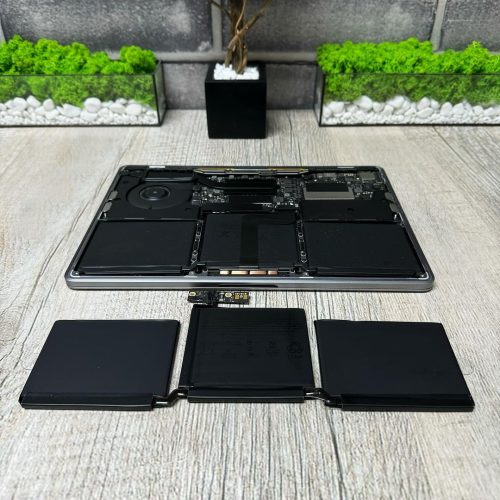
🔥 [Instructions] Replacing battery MacBook Air and Pro (A1708 and A2179)

For every person who uses Apple technology, and in particular a MacBook, it is very important that the device works properly and the battery life does not interfere with everyday activities. Apple assures that the MacBook battery is designed for 1000 full recharge cycles. Subsequently, it provides up to 80% of the original capacity. When we notice that the battery life has decreased significantly, we often do not pay attention and increasingly leave it on charge. But not everyone knows that long-term use of a MacBook with a faulty or damaged battery can negatively affect the operation of your device and lead to fraught consequences. A worn out or faulty battery can swell and damage the keyboard or touchpad on your device. Based on this, it is important to understand that it is not worth bringing the MacBook battery life to the last stage. In order to find out the number of recharge cycles on your device, you just need to go to the power properties of your MacBook.

Read more